
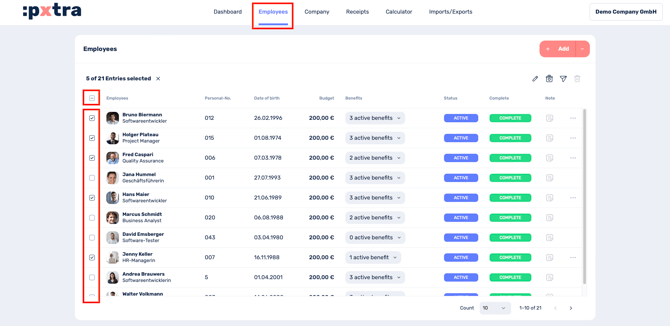
The benefit budget for employees can be easily set using the employee overview on our platform. To do this, select Employees in the top menu bar and activating the checkbox next to the employees name to mark the respective employee.
You can also change the budget of multiple (or all) employees at the same time. Simply select all employees by activating the top checkbox above the employee list.
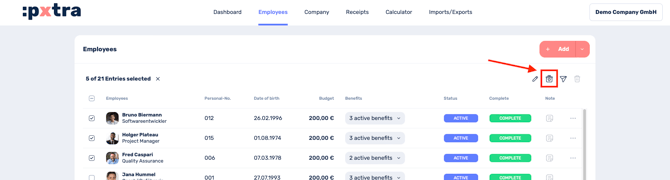
After activating the applicable employee entries, click the present-icon in the top right of the toolbar to adjust the budget.
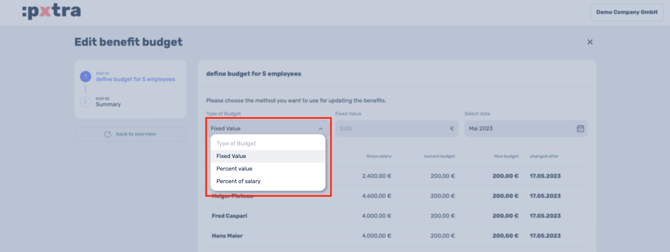
You can then choose the method you want to use to adjust the budget. Available options are Fixed value, Percent value and Percent of salary.
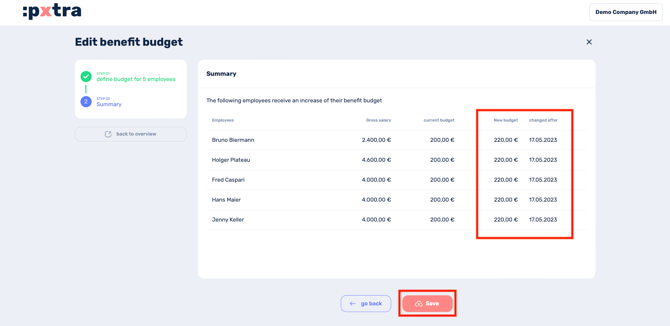
By clicking Continue it takes you to an overview of the budget changes you are going to make.
After clicking Save, your changes will be applied and the affected employees receive a email notification about the changes.
IMPORTANT: It is not possible to reduce the budget in the platform, as it must be checked in advance whether the budget can be reduced without further ado or whether adjustments to the benefit selection are necessary.
If you need to reduce the budget, send us an email to cm@pxtra.de with the facts and we will check whether and how an adjustment is possible.
What is a recommended budget amount?
Do you need a guideline for the budget amount for the start of the :pxtra launch?
No problem.
We want to offer our customers a colorful bouquet of benefits.
To ensure that the various benefits can be used and combined by employees, we recommend a minimum budget of €50-100.
With a budget of €150-200 per month, your employees have even more options to choose from the range of benefits you have defined.
Hint: You can start with a smaller budget and increase the budget for your employees from year to year instead of regular salary increases.