
Do you offer all employees the same range of benefits and have just one benefits package? Or do you want everyone to receive the same budget, without distinguishing between them based on specific criteria?
In that case, the Default Values feature will help you automatically populate relevant app usage data for your employees.
How does it work?
Navigate to the Benefits section on the platform and then to Default Values.
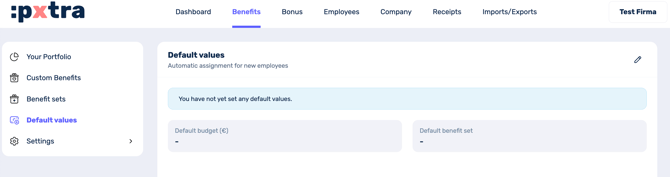
You’ll see a field for the budget and a field for the package.
Depending on what you set here, this value will be assigned to all employees you add using these settings.
In other words, if you set a default value of 20 EUR and select the standard package as the benefit package, newly added employees will be automatically assigned a budget of 20 EUR and the standard package.
This means that once you’ve created the employee, you can save time and may only need to enter one of the two details manually (if you set only one of the fields as the default) or you can send the invitation straight away (if both fields are set to a default value).
When does it make sense to set default values?
If you offer the same budget or the same benefits package to all employees in your company. If you structure the budget or benefits selection differently – for example, depending on working hours, whether someone is still on probation, or similar – you should continue to enter the data manually.