With the Bonus Module, you can map special payments and one-time or predictable additional benefits for employees in a structured, transparent, and compliant way via pxtra.
The entire process, from planning and communication to the export for payroll processing, takes place centrally on the platform.
The Bonus Module can be used independently or combined with all other pxtra packages.
🎁 What Types of Bonuses Are Available?
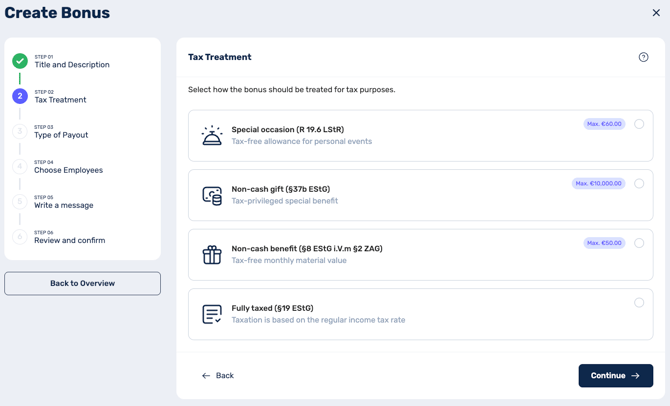
| Tax Treatment | Taxes & Social Security | Max. Amount per Employee | Form of Payout |
| Non-Cash benefit (§ 8 EStG) |
Free for Employer & Employee |
50,00 € / Monat |
Voucher / external Non-Cash benefit |
|
Special occasion |
Free for Employer & Employee |
60,00 € / Anlass |
Voucher / external Non-Cash benefit |
|
Non-Cash gift |
30% flat-rate tax (paid by Employer) & Social Security |
10.000,00 € / Jahr |
Voucher / external Non-Cash benefit |
|
Fully taxed |
Subject to Tax & Social Security |
Keine Begrenzung |
Cash payout / via regular payroll processing |
⚠️ Important Special Rules for Selection
-
Tax-free Benefit: Use as a Benefit or in the Bonus Module
The tax-free benefit can only be used in the Bonus Module if it is not already provided to your employees as a monthly benefit budget. Parallel use would lead to complex overlaps of the monthly tax-free limit. This strict separation guarantees absolute legal certainty and simple administration -
Special Occasion: Legalities and Deadlines
A requirement for this tax-free bonus is a specific, objectively justified event (e.g., birthday, wedding, birth)
-
-
Important Deadline: The event must occur no more than one month prior to the selected payout month. Please note that compliance with this deadline is your own responsibility.
-
Why is this so important? The tax office requires a close timeframe. Since the actual provision of the voucher (the tax-relevant "inflow") always takes place in the month following the payout selection, the deadline clock continues to tick in the background. By ensuring the event is a maximum of one month old, you guarantee that the later provision remains safely within the time window allowed by tax authorities.
-
Tip: Is a milestone further in the past? Simply use the Non-cash Benefit (§ 37b EStG). Here, the company pays a flat 30% tax, but there are no strict deadlines regarding the event.
-
➕ Create a Bonus in 7 Steps
- Navigate to the Bonus area in the platform and click "Create bonus".
- Set the title and description of the benefit.
- Choose the desired tax treatment.
- Define the payout period (one-time or recurring).
- Select the eligible employees.
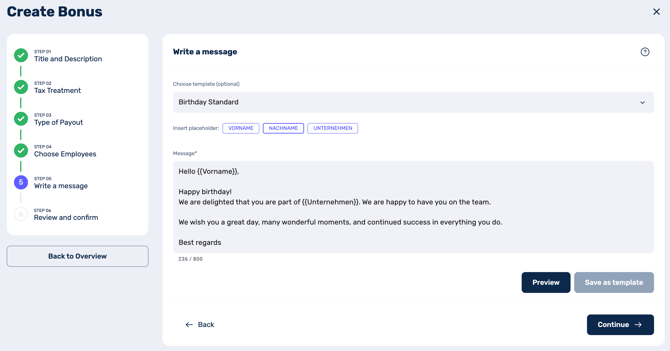
- Optionally write a message to the employees (templates and placeholders available).
- Review all details and confirm the planning.
After confirmation, the bonus planning is created and activated at the defined time.
One-time vs. Recurring: Which one should I use?
-
One-time payout: Intended for events that do not occur regularly (e.g., weddings, project bonuses, or births).
-
Recurring payout: You define a rule (e.g., birthdays or every 5 years for an anniversary) and the payout occurs automatically based on the stored employee data.
Anniversary Logic
There are two variants for anniversaries:
-
One-time: Captures a specific milestone (e.g., specifically the 10th anniversary).
- Recurring: Sets a fixed rhythm (e.g., every 5 years) that is checked individually and triggered automatically for each employee.
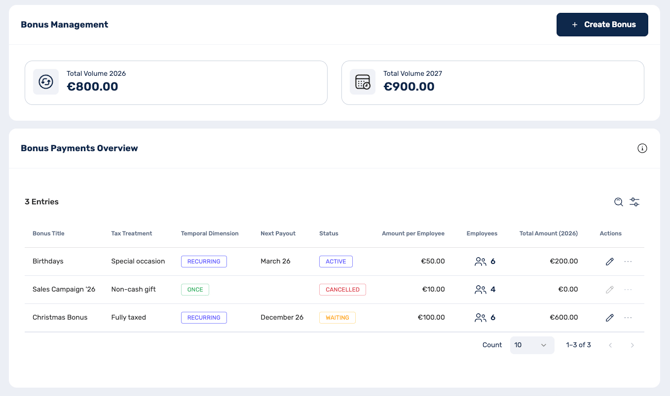
🔄 What happens after activation?
Once confirmed, the bonus planning is created and goes through the following status phases:
-
Pending: Successfully stored. The process starts automatically on the start date.
-
Active: The execution is running according to your defined rules.
Completed: All payments have been carried out (now serves as documentation).
-
Paused: Execution interrupted. Missing payments are not made up later.
-
Cancelled: Process ended; no further payments will take place
Communication & Deadlines for Employees
As soon as a bonus is paid out, employees receive a message in the pxtra app. You can use templates, placeholders, and free text for this communication.
-
For Vouchers: Employees select their desired voucher themselves in the app. They have one month to do this for the tax-free benefit and three months for all other benefits. Vouchers are valid for 3 years after delivery.
-
For Salary Payouts (Fully Taxed): The payment flows directly into the next regular payroll.
-
For External Non-Cash benefit: Employees receive a message in the app about the additional benefit. Since no voucher selection is necessary, they do not need to take any further action in the app. You handle the actual handover of the bonus flexibly outside the platform.
📤 Export & Further Processing
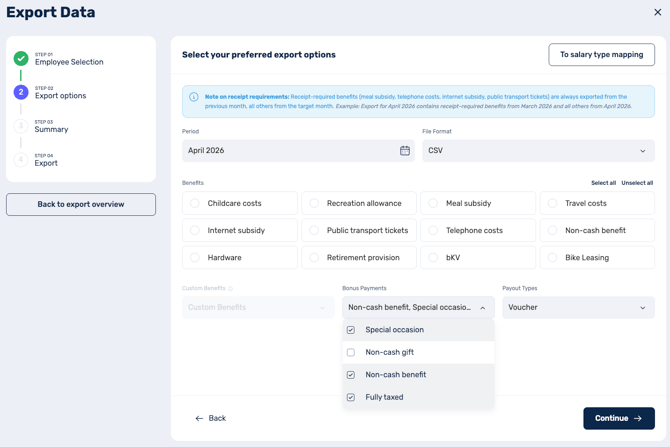
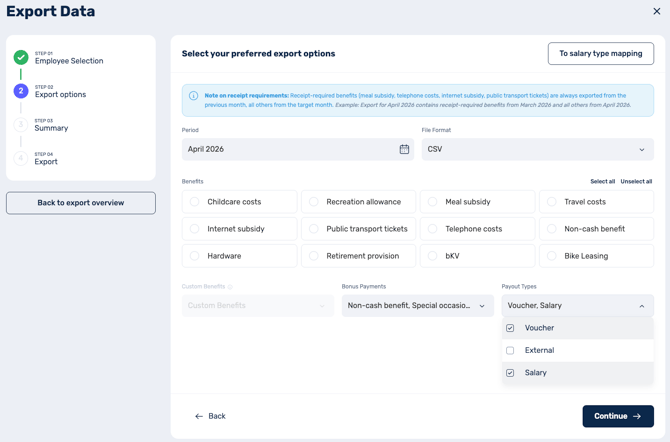
All created bonuses are exported in a structured format to your payroll system and automatically assigned to the correct pay type. You decide flexibly which bonuses to include in the export. These are filtered by tax treatment and payout method. For example, you can choose to only include bonuses issued as vouchers and exclude bonuses with external payouts.
- You configure the pay type mapping once in the settings under "Payroll Export" > "Benefits"
- If you exclusively use the Bonus Module, you can find this setting under "Company" > "Payroll Export"
When do bonuses appear on the payroll?
This depends on the payout method. Bonuses with the payout method "External" or „Payment with salary" appear on the payroll directly in the month of disbursement.
For bonuses issued as vouchers, it works differently: due to separate invoicing, these only appear on the payroll in the month the voucher is actually issued. For birthday and anniversary bonuses, this can be up to two months after the disbursement, as employees have until the end of the following month to select their voucher.
The final tax and social security processing is handled by the respective payroll system.
Disclaimer: The Bonus Module does not constitute tax or legal advice. Responsibility for correct application lies with the company.
Any questions? Feel free to contact our support: cm@pxtra.de