
With immediate effect, all employees can be invited, regardless of whether they have a work email address.
Employees without a work email address can instead register using a personalised QR code, providing their personal email address in the process. You can pass on the PDF containing the QR code in whichever way suits you best: share it digitally, print it out and hand it over, or send it by post.
What will change for you as a company manager?
-
The email address is no longer a mandatory field when adding employees.
-
For employees without a work email address, we automatically generate individual PDFs, which you can then forward to the relevant employees.
-
Your employees’ personal email addresses are never visible to you on the platform.
Step 1: Upload employee master data
Creating and adding employees works as usual (How to invite employees to :pxtra?). Simply leave the email address field blank if there isn’t one.
Step 2: Send the invitation
As soon as you send the invitation, a new dialogue box will open: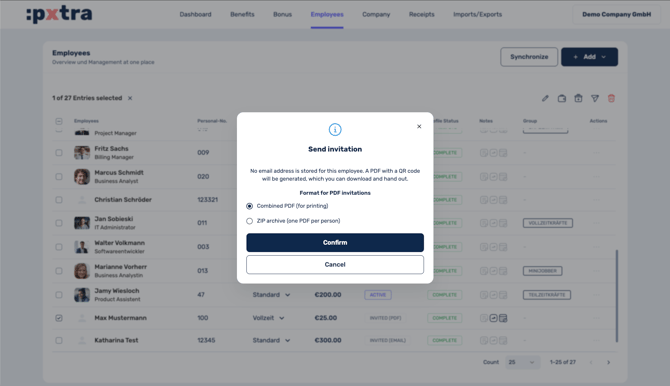
pxtra generates a personalised PDF for all employees who do not have a work email address. You can pass on the PDF in whichever way suits you best: share it digitally, print it out and hand it over, or send it by post.
⚠️ Important: Each PDF is personalised and must only be given to the person it is intended for, as the QR code and one-time code are used to uniquely register that person.
What does the PDF contain?
Each PDF contains two equivalent ways to register:
-
A personal QR code – scanning it starts the registration process directly on your smartphone.
-
A one-time code – for manual entry in your browser.
Both methods lead to the same result and can only be used once for initial registration.
How do employees register?
After scanning the QR code or entering the one-time code, employees follow this process:
-
Enter their personal email address
-
Set a password
Once this is complete, the account is active and ready to use.
How do employees log in afterwards?
Login can be carried out on any device using:
-
a personal email address and password
-
or Single Sign-On
It is not necessary to scan the QR code again to log in; this is required only for the one-off registration.
Data protection: Who can see the personal email address?
The personal email address is visible only to pxtra, as the platform operator. Neither you, as the Company Manager, nor anyone else in the company can see this address on the platform. This applies regardless of any other permissions that may have been granted.
Lost access: What happens if employees can no longer log in?
If an employee no longer has access to the private email address on file, the recovery process is as follows:
-
The employee contacts HR.
-
HR issues a new, personalised PDF via the platform.
-
The employee registers using a new email address.
-
The existing profile and settings remain unchanged. Only a new email address is stored for the login.